# Markdown
[Markdown](https://commonmark.org/help/) is a simple text format with light markup optimized for reading it in plain text which allows to create consistent looking articles, blog posts and documentation.
All essential features like headings, lists, links, **bold**, *italic*, and `code blocks` are included.
## Viewing
XMLSpy will display Markdown as HTML in Browser View.
## Editing
For editing Markdown you can use Text View which supports syntax highlighting.
## Features
### Code blocks with syntax highlighting
Code blocks starting with triple backtick may have a syntax specifier like xml, xquery, html, css, js, cpp, python, etc.
*Example:*
On this XML
```xml
Mary20Cindy25John40Peter35
```
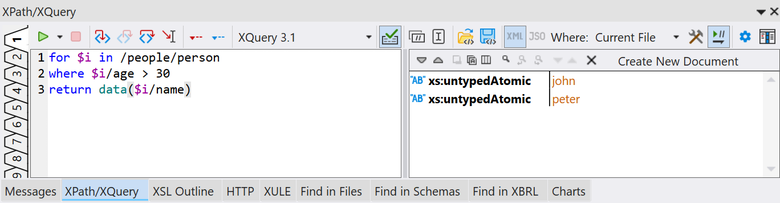
run the following XQuery code in the **XPath/XQuery** Output Window
```xquery
for $i in /people/person
where $i/age > 30
return data($i/name)
```
in order to get the result below.
### Tables
The result of the above query can be presented as a table:
| Type | Value |
|----------------------|-------|
| **xs:untypedAtomic** | John |
| **xs:untypedAtomic** | Peter |
### Raw HTML
Raw HTML syntax can be used to display the above result as a picture which is both, DPI aware and theme aware:
```html
```